















Imagine you are at a trade show. A potential customer approaches your booth, you chat for thirty seconds and, just before saying goodbye, you bring a card to his cell phone. Without unlocking the screen, without opening the camera, without looking for any app. In less than a second, your complete professional profile appears in their browser: name, position, phone, email, LinkedIn, product catalog and even a corporate video. That's exactly what an NFC card does.
In this guide we explain what an NFC card is, how the technology behind it works, what is recorded on the chip and how you can start using it to share your contact professionally and instantly.
What is an NFC card?
An NFC card is an physical card -made of plastic, wood or metal, which has a small chip integrated with NFC (Near Field Communication) technology. This chip stores a URL that, when the card is brought close to a compatible smartphone, opens automatically in the receiver's browser.
Simply put, it's a business card that transmits your contact information just by holding it up to a cell phone. No apps, no scanning, no hassle.
Difference between NFC card and digital card
This is where many people get confused, so let's make it clear from the start:
- Digital cardis an online profile (a personalized web page) that contains your contact information, photo, links to social networks, documents, videos and any resource you want to share. It is pure software, it has no physical component.
- NFC cardThe chip is the physical support (the card that you can touch) with an embedded chip. What the chip does is to redirect to the digital profile. In other words, the NFC card is the vehicle; the digital card is the content.
When someone holds your NFC card up to their phone, what they see is your NFC card. digital business cardInteractive profile with buttons to call you, send you an email, save your contact in your address book or visit your website.
Components of an NFC card: the chip, the antenna and the bracket
Every NFC card consists of three elements:
- The chipA web link: a tiny integrated circuit that stores data (in this case, the URL of your digital card). Its capacity is limited - usually between 137 and 888 bytes - but enough to store a web link.
- The antennaA very thin copper spiral that surrounds the chip. It is in charge of capturing the smartphone's energy and transmitting the stored data.
- The supportThe visible material of the card (PVC, wood, metal). It is what you touch, what you see and where your company's corporate design is printed.
These three components work together so that, with a simple gesture, your professional information reaches anyone's cell phone.
MEMORABLE
First impressions leave a lasting impression
Turn a greeting into a meaningful relationship.
- Networking - Stand out by generating contacts with the "Networking Mode".
- Control - Measure the contacts generated from the Lead2Team manager and connect it to your CRM.
- Customizable - Communicate everything about you and your business with your brand image.


EFFECTIVE
With a simple gesture share your Digital Card
Analyze the metrics of the contacts generated with the NFC Digital Business Card.
- Comfort - Your information and contact links in a single space.
- Savings - Using the NFC card saves on paper cards and generates less environmental impact.
- Bidirectional - Share your contact and receive your customer's contact immediately.
How does NFC technology work?
NFC stands for Near Field Communication (near field communication). It is a wireless technology that allows data to be transmitted between two devices that are in close proximity, at a distance of 1 to 4 centimeters.
NFC in 30 seconds: the simple explanation
Think about how a public transportation card works. You hold it up to the bus reader, it beeps and the door opens. You haven't pressed a button, you haven't entered a code. You simply held it up.
An NFC business card works in much the same way. When brought close to a smartphone:
- The cell phone generates a short-range electromagnetic field.
- This field activates the NFC card chip (which does not have its own battery).
- The chip transmits the stored URL to the cell phone.
- The cell phone automatically opens that URL in the browser.
- Your contact sees your complete digital profile on their screen.
All this happens in less than a second. No apps to download, no codes to scan, no technical complications.
Why don't you need a battery or charge?
The NFC chip in a business card is of the following type passive. This means that it has no power source of its own: it has no battery, it does not charge, and it does not run down. It receives the energy it needs from the smartphone itself when it gets close enough.
It is like an acoustic guitar: it does not need an amplifier or electricity to sound. The energy comes from the musician himself (in this case, the cell phone). That's why an NFC card can last for years without any maintenance.
What is recorded on an NFC card? The digital profile
This is probably the most important point of the whole article. What is recorded on the NFC chip are not your contact details directly. What is recorded is a link (URL) pointing to your digital card, i.e. your online profile.
The complete flow: digital card -> NFC chip -> contact cell phone
This is how the process works from start to finish:
- Create your digital card on a platform such as Lead2Team: name, position, photo, telephone, email, social networks, documents, videos...
- This digital card generates a unique URL (e.g,
cards.yourcompany.com/name). - This URL is recorded in the NFC chip. of your physical card.
- When you bring the card close to the cell phone the chip transmits the URL and the browser opens your digital profile.
The advantage of this system is huge: as the chip only stores a link and the actual content is in the cloud, you can update your digital card as many times as you want without touching the physical card. You change your job title, phone number or company, and just update your online profile. The next time someone touches your NFC card to their cell phone, they will see the updated version.
What information can your digital profile contain?
With platforms such as Lead2Team, your digital business card may include:
- Name, position and profile picture
- Direct telephone (with call button)
- Email (with button that opens the email client)
- WhatsApp direct
- LinkedIn, Instagram, Twitter/X, TikTok profile.
- Link to corporate website
- Downloadable PDF catalog
- Corporate video
- Link to agenda for booking meetings (Calendly, etc.)
- Location on Google Maps
- Save contact« button (automatic download of vCard)
All this, accessible with a single touch of the NFC card.
FOR PROFESSIONALS AND TEAMS
Create your digital card in 5 minutes ⚡
Very useful for:
- Commercial agents - Product experts - Brand ambassadors.
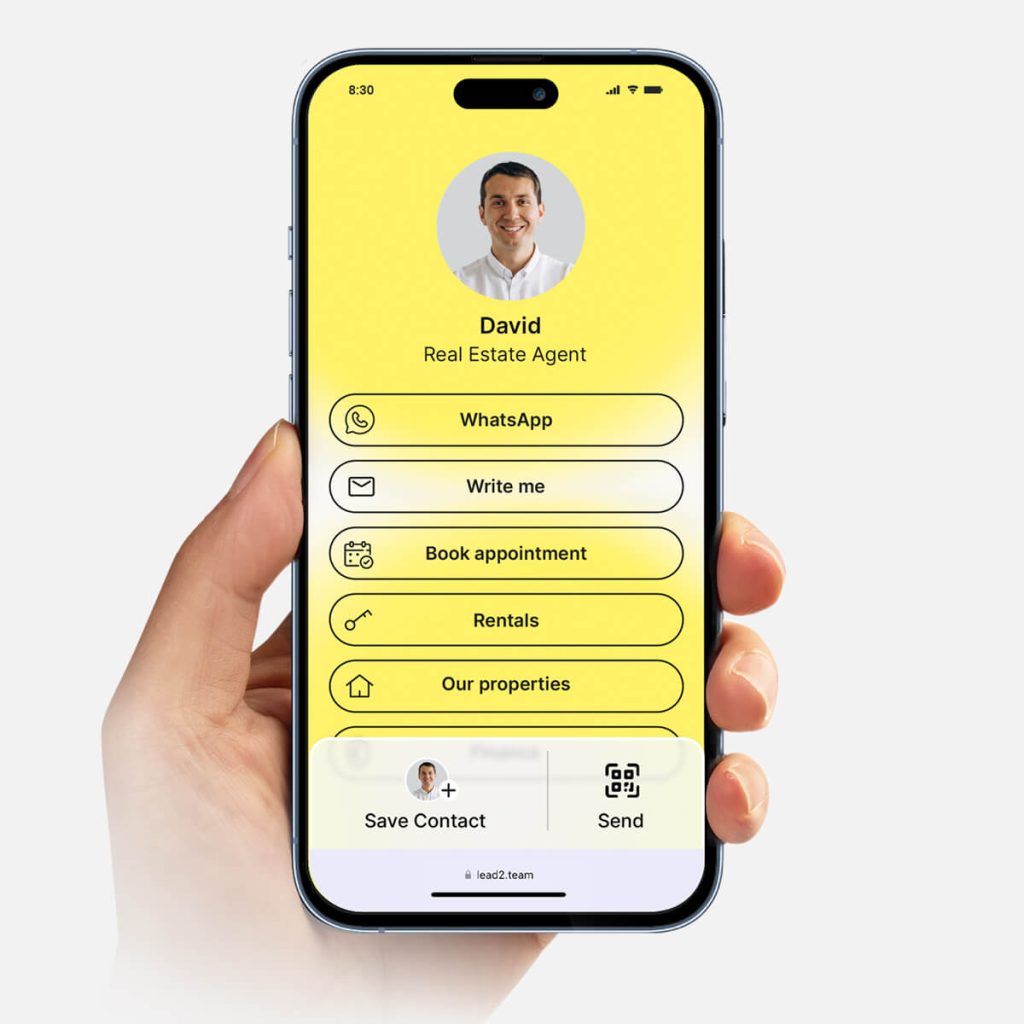
More than 20 channels available:
- Whatsapp - Email - Call - Appointment reservation - Featured links, and many more.

It can be shared with the NFC card, like any other URL or by scanning a QR code.
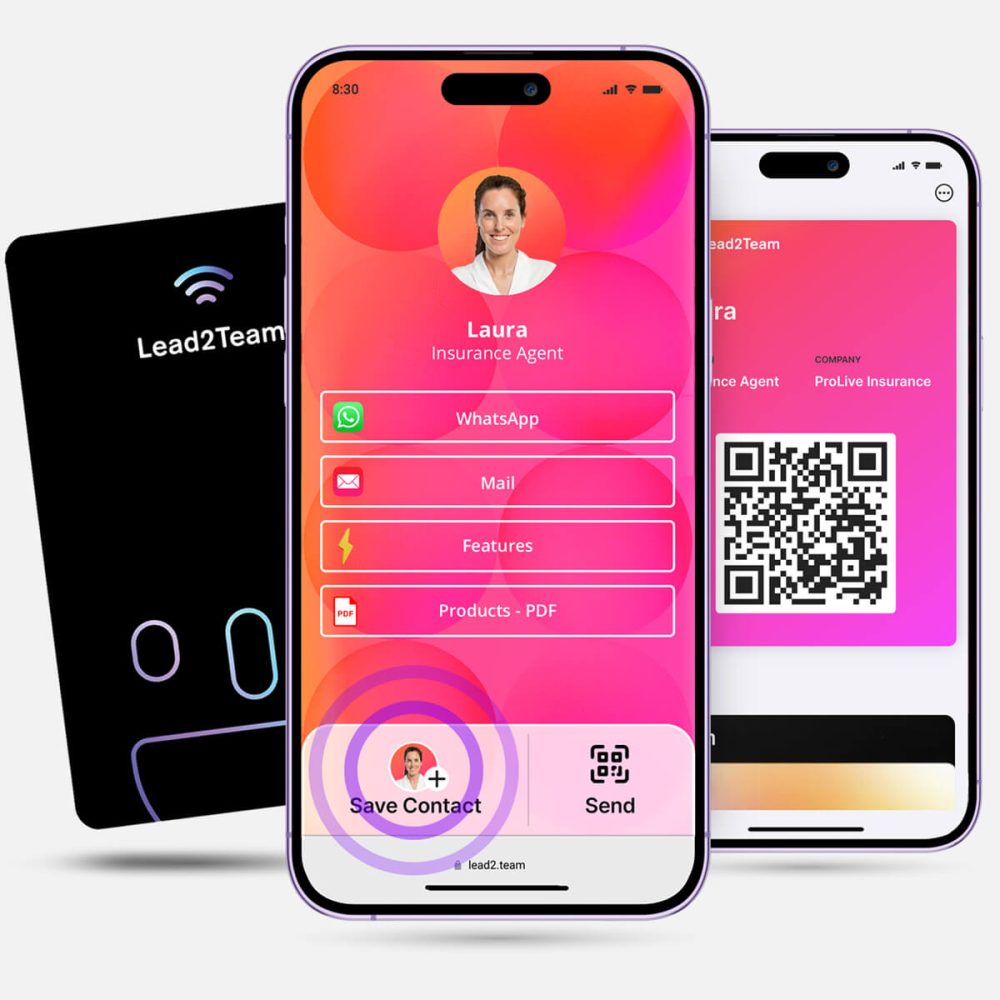
Step-by-step guide to create your Digital Card [UPDATED 2024]. Watch on Youtube
Types of NFC cards: materials and formats
Not all NFC cards are the same. Depending on the material, finish and intended use, you can choose from several options.
Plastic (PVC) NFC cards
They are the most common and economical. Made of PVC with a finish similar to that of a credit card. Water resistant, flexible and with good durability. Ideal for large equipment where a high volume of cards is required.
Wooden NFC cards
Premium and ecological option. The touch and texture of wood generate an immediate differentiating effect. Perfect for brands that want to transmit sustainability and careful design.
Metal NFC cards
The top-of-the-line option. Stainless steel or anodized aluminum cards with a weight and feel that convey exclusivity. Ideal for managers and executive profiles.
Other formats: bracelets, key rings and NFC stickers
The NFC chip does not necessarily have to be in card format. There are also NFC wristbands (perfect for events), key chains and adhesive stickers that you can place on any surface. If you want to learn more about the materials and designs available, check our customized NFC card guide.
Which cell phones support NFC?
The good news is that the vast majority of smartphones today support NFC. If your contact has a phone manufactured within the last five or six years, chances are it will work without any problems.
Compatibility on iPhone
All iPhones from iPhone 7 include NFC chip. From the iPhone XS/XR (2018 onwards) with iOS 14 or higher, the reading is completely automatic: you just need to bring the card close to open the profile. There is no need to open any app or activate anything.
Compatibility on Android
Most mid-range and high-end Android phones include NFC as standard. Samsung, Google Pixel, Xiaomi (mid-high range), OnePlus, OPPO, Huawei... Virtually any modern Android is compatible. Just check that NFC is enabled in Settings > Connections.
If you want to see the complete list of compatible devices, we have a dedicated article on NFC support on cell phones.
And if the contact's cell phone does not have NFC, no problem. All Lead2Team NFC cards come with a backup QR code printed on the back of the product. Any cell phone with a camera can scan it and also access the digital profile.
METRIC AND RANKINGS
Analyze how they interact with your NFC Digital Business Card
When the user scans the NFC card he/she accesses the Digital Card, so you will have metrics of all interactions generated from each card.
Connect and export leads to your CRM using Zapier.

Advantages of using NFC cards for contact sharing
Versus paper: upgradable and waste-free
A paper card becomes obsolete as soon as you change phone number, job title or company. You have to redesign, reprint and redistribute. With an NFC card, you update the digital profile online and the physical card continues to function with the new information. A single NFC card can replace hundreds of paper cards over its lifetime.
Versus QR: faster and without scanning
A QR code requires your contact to unlock the phone, open the camera, focus and wait. An NFC card only requires one touch. It's faster, more natural and doesn't depend on lighting or focus distance. Of course, both technologies are complementary: that's why Lead2Team's NFC cards have a backup QR on the back. If you want to compare the two options in detail, see our article on NFC card vs. QR code.
The wow effect in meetings and events
Sharing your contact with a touch generates an immediate reaction. It's a professional, technological and memorable gesture that sets the user apart. At trade shows, conferences and networking meetings, the NFC card becomes an icebreaker that opens conversations and leaves a lasting impression.
NFC cards for enterprises: equipment management
Where the NFC card shows its full potential is in the business context. It's not just about having a nice card: it's about managing the cards of an entire team efficiently.
Centralized panel to manage all cards
With Lead2Team, an administrator can manage from a single panel all digital and NFC cards in the company. Create profiles, assign corporate designs, define connector templates by department and send the cards to each employee with an onboarding email that includes the link, Wallet download and email signature.
This ensures brand consistency throughout the organization: every salesperson, every manager and every technician shares the same corporate image, but with their own personalized data.
Reassign NFC cards between employees
One of the most practical functionalities: Lead2Team's NFC cards are reusable. If an employee leaves the company or changes position, you can reassign their physical card to another person directly from the platform. The NFC chip will redirect to the new digital profile without the need to produce a new card.
Advice for companies with high turnoverDesign NFC cards with your corporate logo and colors, but without the employee's name printed on them. You can then redistribute them with complete flexibility.
If you want to know the plans available for teams, visit our section of pricing and plans for NFC cards.
OUR CUSTOMERS
More than 1600 companies already use Lead2Team
Automotive, Insurance, Real Estate, Food, Consulting, E-commerce and many more.

"Lead2Team makes it easy for clients to contact me - I use the digital card at all my events!"
Joan BlascoEvent Planner Santa Pari
Read article

"Lead2Team is simply great. It helps me centralize all channels in one place so I don't drive the customer crazy to contact me."
Beatriz Lozares, Founder of Fluidea
Read article
What is an NFC Business Card?
It is a physical PVC card with a QR code and NFC technology. Inside it contains a chip on which you can record the URL of your digital card.
Does Lead2Team software require a monthly subscription?
It is not necessary to activate a subscription to be able to use the NFC card. Lead2Team Business, Pro and Premium payment plans include advanced functionalities but are completely optional.
You only need to create a free profile to obtain the URL of your digital card.
You can register for free here
How does the Lead2Team NFC card work?
Just touch the NFC card to a mobile device. The other person will then be able to access your digital profile and interact with the content/links on your card or exchange contact with you.
Where on the cell phone do I have to bring the card close to it for it to detect the NFC?
iOS: brings the card close to the top back of the phone.
Android: brings the card close to the center back of the phone.
What is the QR on the Lead2Team NFC card for?
All iPhones have NFC technology.
For Android, you can check the list of compatible devices in the following link
Remember that your card also has a QR Code that the other person can scan in case NFC does not work.
Does NFC technology always work?
NFC does not usually give connectivity problems, but it may not work in the following cases:
- Your cell phone does not have NFC technology
- You have deactivated the NFC function of your cell phone.
- You have your cell phone in "battery saving" mode.
- Your cell phone is locked (on some devices it is necessary to unlock the home screen first and then bring the NFC card near)
- You have your camera or flashlight turned on
Remember that your card also has a QR code that the other person can scan in case the NFC does not work..
How do I exchange my contact with another person from the Lead2Team NFC card?
From your digital profile you can activate the fNetworking functionality that will display the "Save contact" button on your digital card. This way, you can exchange contact data with another person and save the new contact in the phone's address book.
Please note that Networking functionality is only available in our plans. Business, Pro and Premium. It is not included in the Basic plan, which is free.
How long does my Lead2Team NFC card last?
The NFC card has no expiration date. It will work as long as you have an active digital profile in Lead2Team and it is linked to the NFC card.
Can I track interactions with my NFC business card?
Yes, from the Lead2Team dashboard you can see the interactions that have been generated from the NFC card; such as the number of touches, clicks and profile leads.
Conclusion: Is it worth using an NFC card?
If you work in an environment where face-to-face networking matters - sales, trade shows, events, business meetings - the NFC card is a tool that makes a difference. It's fast, professional, upgradeable and reusable.
But remember: the NFC card is the perfect complement to your digital card, not a substitute. Your digital profile works on its own via link, QR code, Wallet and email signature. The NFC card adds a physical, tactile and memorable layer to that experience.
With Lead2Team you can create your digital card for your entire team, customize the design with your brand and link it to NFC cards that are managed from a single panel. 7 days free trial, no credit card required.
If you have any further questions, please consult our frequently asked questions and myths about NFC cards or take a look at the complete guide to NFC security and privacy.
Carga masiva y vista excel
Gestiona grandes volúmenes de datos de forma eficiente
Gestor de diseños, adaptable a tu branding
Personaliza el diseño para que coincida con tu marca
Email automático de onboarding a empleados
Automatiza el proceso de incorporación de nuevos empleados
Sistema de plantillas por departamentos o marcas
Organiza y gestiona plantillas por departamento o marca
Soporte local. Multiidioma
Atención al cliente en tu idioma y zona horaria
Tus datos están seguros y cumplen con el RGPD
Cumplimiento total con la normativa de protección de datos
Métricas e Integración con CRM
Conecta con tu CRM y analiza el rendimiento
Compatible con WALLET – NO requiere apps
Usa Apple Wallet y Google Wallet sin descargar apps
Integración en la web
Copia y pega el código en la web. Mucho más que una tarjeta digital
What is an NFC card and what is it used for?
An NFC card is a physical card with an integrated chip that transmits information to a smartphone by simply touching it. In the professional field, it is used to share your digital business card instantly: your contact receives your complete profile on his or her cell phone with a single touch.
How do you write a digital card to an NFC chip?
In platforms like Lead2Team, the process is automatic. You create your digital card (online profile), receive the physical NFC card and link it to the profile from the management panel. You don't need any recording apps or technical knowledge.
Do NFC cards need battery or charging?
No. The NFC chip is passive and draws power from the smartphone as it approaches. It has no battery, does not charge and does not run down. It can run for years without maintenance.
Which cell phones can read NFC cards?
iPhone 7 onwards (automatic reading from iPhone XS with iOS 14+) and most mid-range and high-end Android phones. More than 90% of current smartphones are compatible. See the complete guide to NFC compatibility.
Can an NFC card be reused for another person?
Yes, with Lead2Team you can reassign a physical NFC card to a new digital profile from the platform. The physical card keeps the printed design, but the chip redirects to the new profile.
How long does an NFC card last?
The NFC chip has no moving parts and no battery, so its lifetime is practically indefinite. The durability depends more on the material of the card (PVC, wood, metal) than on the chip itself.
Does the NFC card work without internet?
The chip transmits the URL without the need for internet. However, the receiving cell phone does need a connection to open the digital profile in the browser. Offline, the link is saved and can be opened later.
Is an NFC card the same as a digital card?
No. The digital card is the online profile (software). The NFC card is the physical support (hardware) that redirects to the digital profile. You can have a digital card without NFC (sharing it by link, QR or Wallet), but the NFC card needs a digital card to have content to display. Both are complementary. More information in our digital business card guide.
